



Minecraft: Java Edition
Sandbox · Mojang
Optimizing Minecraft Startup Flags
How to choose and apply curated Minecraft JVM startup flag presets (Aikar's G1GC, Generational ZGC, Shenandoah, Modded G1GC, Proxy, SIMD) in the Rogue Wave Hosting panel.
On this page 4
Garbage collection lag spikes—where ticks freeze for a second every few minutes—are usually caused by untuned JVM arguments rather than a slow CPU. Startup Flags gives you a visual editor with curated, container-safe JVM presets tuned for your exact Java version and RAM allocation.
Understanding the Startup Flags Page
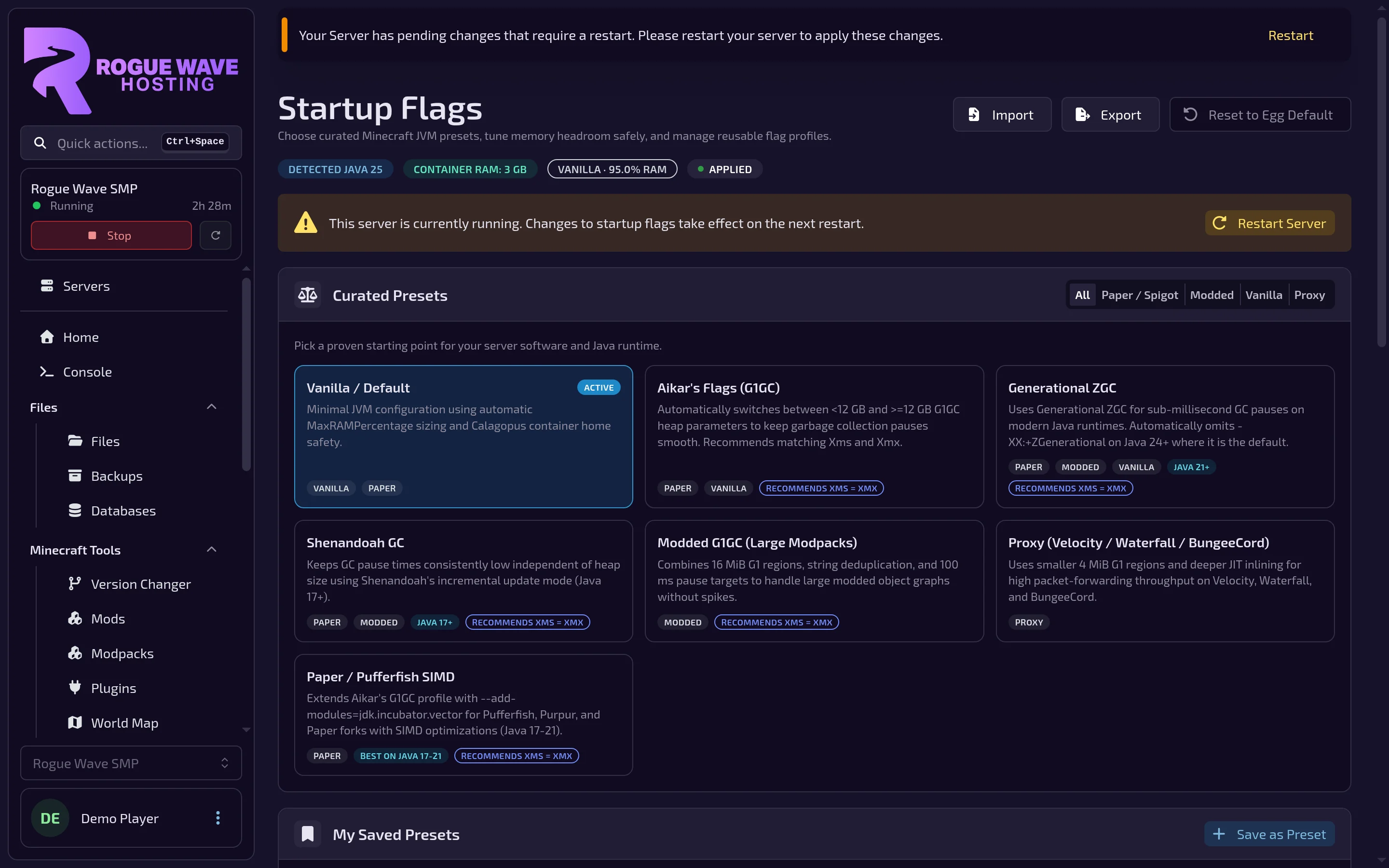
Open your Minecraft server in the Game Panel and click Startup Flags in the left sidebar.
At the top of the page, status pills summarize your server’s runtime environment automatically:
- Detected Java version (for example,
DETECTED JAVA 25orDETECTED JAVA 21) — Used to omit deprecated flags and unlock modern collectors like Generational ZGC. - Container RAM (for example,
CONTAINER RAM: 3 GB) — Ensures JVM heap sizing leaves safe headroom for the operating system and container overhead so your server doesn’t get OOM-killed. - Active profile & status — Shows your currently applied preset, RAM percentage, and whether it is
APPLIED.
Top-right toolbar buttons let you Import or Export flag profiles as JSON to share across servers, or click Reset to Egg Default at any time to restore the stock startup configuration.
Which Preset Should You Pick?
Filter Curated Presets by All, Paper / Spigot, Modded, Vanilla, or Proxy, then choose the preset that fits your server software and Java version:
| Preset | Best For | Java Requirement | Why Pick It |
|---|---|---|---|
| Aikar’s Flags (G1GC) | Paper, Purpur, Spigot, Vanilla (default recommendation) | Java 17+ | Battle-tested G1GC profile that automatically adapts parameters for <12 GB vs >=12 GB heaps to keep pause times smooth. |
| Generational ZGC | Paper, Purpur, Vanilla, or Modded on modern Java | Java 21+ | Sub-millisecond GC pauses with minimal hitching. Automatically omits -XX:+ZGenerational on Java 24+ where generational mode is the default. |
| Modded G1GC (Large Modpacks) | Forge, NeoForge, Fabric modpacks | Java 17+ | Combines 16 MiB G1 regions, string deduplication, and 100 ms pause targets to handle large modded object graphs without spikes. |
| Shenandoah GC | Paper or Modded servers sensitive to pause spikes | Java 17+ | Low-pause concurrent collector using incremental update mode so pauses stay short even on large heaps. |
| Paper / Pufferfish SIMD | Paper / Purpur forks using vector optimizations | Java 17–21 | Extends Aikar’s G1GC with --add-modules=jdk.incubator.vector for SIMD-accelerated operations on supported forks. |
| Proxy (Velocity / Waterfall / BungeeCord) | Velocity, BungeeCord, Waterfall proxies | Java 17+ | Uses smaller 4 MiB G1 regions and deeper JIT inlining optimized for fast packet forwarding on low-RAM proxy containers. |
| Vanilla / Default | Lightweight Vanilla or baseline testing | Any Java | Minimal JVM configuration using automatic MaxRAMPercentage sizing and container-safe defaults. |
Quick Recommendations
- Running Paper or Purpur? Start with Aikar’s Flags (G1GC)—or try Generational ZGC if you’re on Java 21+ with at least 6–8 GB of RAM and want the lowest possible GC pauses.
- Running a heavy Forge, NeoForge, or Fabric modpack? Pick Modded G1GC (Large Modpacks) (especially after installing packs via Installing Minecraft Modpacks).
- Running a Velocity proxy? Always choose Proxy (Velocity / Waterfall / BungeeCord).
Applying & Saving Custom Presets
-
Select a Curated Preset
Click any card under Curated Presets to select and review its flags. Cards tagged
RECOMMENDS XMS = XMXwork best when initial heap (Xms) matches maximum heap (Xmx) so the JVM isn’t constantly resizing memory during gameplay. -
Save reusable custom profiles (optional)
Scroll to My Saved Presets and click + Save as Preset to store your own tuned profile, or use Import / Export in the top-right to clone the exact same configuration onto split servers created with Using the Server Splitter.
-
Restart your server to apply
Click Restart Server in the amber banner (or restart from Console & Power Controls) and monitor TPS and memory stability for a few minutes after boot.